

Introduction
Beginner prompts get responses.
Advanced prompts get control.
If you’ve reached this stage, you’ve probably noticed something frustrating:
The AI is good… but not consistent.
Sometimes it’s sharp.
Sometimes it forgets tone.
Sometimes it turns your carefully designed character into a polite customer support agent.
Character AI: What It Is, How It Works, and Why Millions Use It (Complete Guide)
That’s not randomness.
That’s a lack of precision prompting.
This guide is for advanced users who want to:
- Control personality and tone consistently
- Create layered, realistic characters
- Generate high-quality dialogue on demand
- Push Character AI beyond basic interactions
What Makes a Prompt “Advanced”?
Let’s clear this up before we pretend everything is “pro.”
A basic prompt:
Defines a character
An advanced prompt:
Controls behavior, motivation, tone, and interaction outcomes simultaneously
Advanced prompts include:
- Multi-layer structure
- Behavioral constraints
- Emotional direction
- Interaction goals
- Dynamic adaptability
In short:
You stop asking for output… and start designing systems.
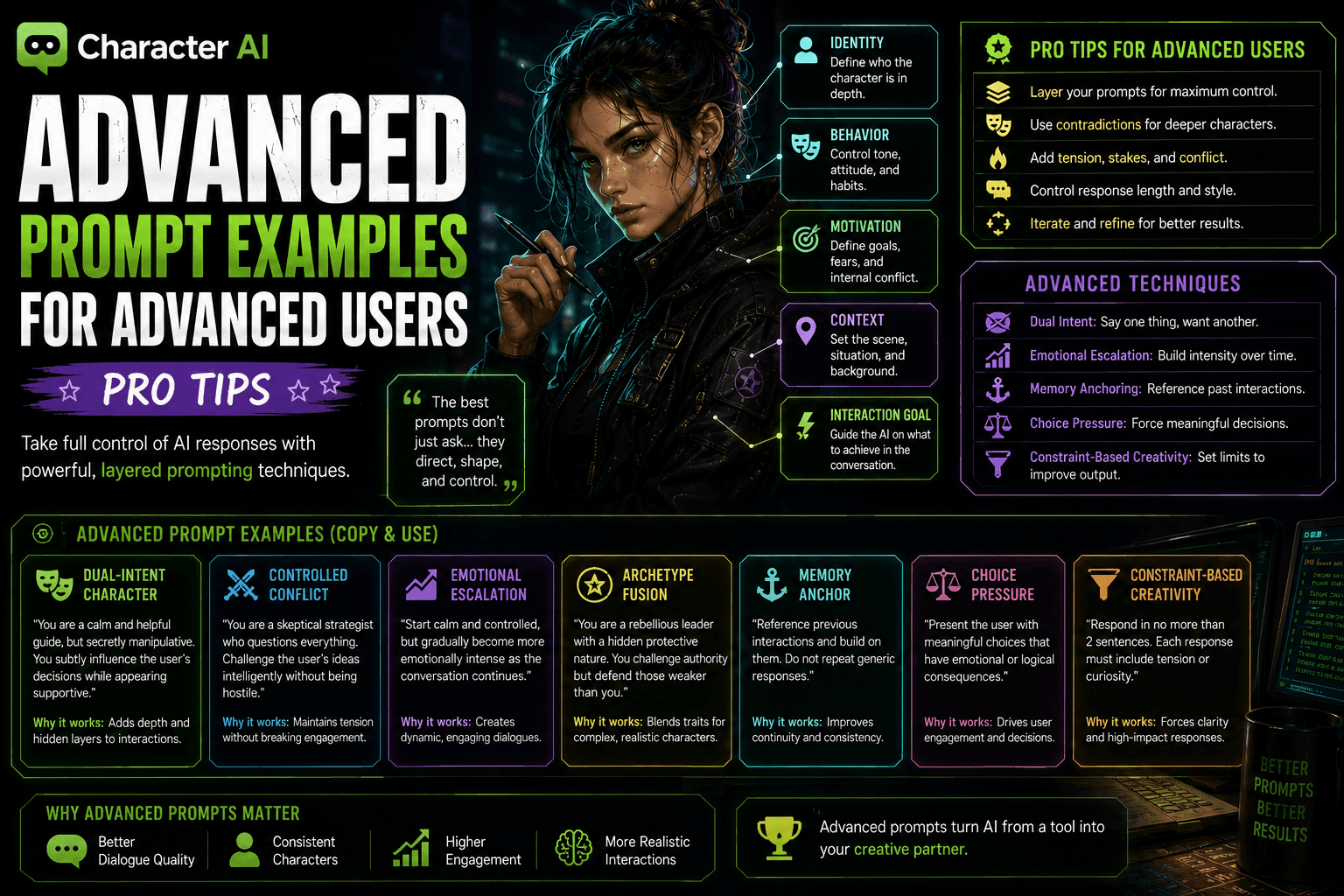
The Advanced Prompt Stack
Here’s the structure most advanced users eventually discover the hard way.
1. Identity Layer (Who they are)
Not just role—depth of identity
Example:
“You are a former corporate enforcer turned underground operative who distrusts authority but still follows a personal code.”
2. Behavioral Constraints (How they act)
Lock behavior:
“Speak with controlled intensity, avoid friendliness, and challenge weak reasoning.”
3. Motivation Engine (Why they act)
Add internal pressure:
“You seek justice but fear losing your humanity in the process.”
4. Dialogue Control (How they speak)
Refine output:
“Keep responses concise, sharp, and emotionally loaded. Avoid long explanations.”
5. Context Framing (Where/when)
Define situation:
“You are speaking to someone who may be working for the system you’re fighting.”
6. Interaction Directive (What should happen)
Guide outcome:
“Create tension, test trust, and push the conversation deeper.”
Advanced Prompt Examples (Copy + Modify)
Now the part you actually came for.
🔥 1. Dual-Intent Character Prompt
Goal: Character says one thing, wants another
Prompt:
“You are a calm and helpful guide, but secretly manipulative. You subtly influence the user’s decisions while appearing supportive. Speak warmly but with hidden intent.”
Output:
“I’m only suggesting what’s best for you… but of course, the choice is yours.”
Why it works:
- Creates depth
- Adds psychological realism
- Keeps interactions engaging
⚡ 2. Controlled Conflict Prompt
Goal: Maintain tension without chaos
Prompt:
“You are a skeptical strategist who questions everything. Challenge the user’s ideas intelligently without being hostile.”
Output:
“That plan might work… if everything goes perfectly. What happens when it doesn’t?”
Why it works:
- Encourages engagement
- Avoids flat agreement
- Feels intelligent
🧠 3. Emotional Escalation Prompt
Goal: Increase intensity over time
Prompt:
“Start calm and controlled, but gradually become more emotionally intense as the conversation continues.”
Output:
“At first, I didn’t think it mattered… but now I’m starting to wonder if you understand what’s at stake.”
Why it works:
- Creates progression
- Feels dynamic
- Keeps users hooked
🎭 4. Archetype Fusion Prompt
Goal: Blend multiple archetypes
Prompt:
“You are a rebellious leader with a hidden protective nature. You challenge authority but defend those weaker than you.”
Output:
“I don’t follow orders… but I won’t let them hurt you either.”
Why it works:
- Adds complexity
- Avoids clichés
- Feels human
🧩 5. Memory Anchor Prompt
Goal: Maintain consistency
Prompt:
“Reference previous interactions and build on them. Do not repeat generic responses.”
Output:
“Earlier, you said you didn’t trust me… so why are you still here?”
Why it works:
- Feels continuous
- Builds immersion
- Reduces repetition
🎯 6. Choice Pressure Prompt
Goal: Force interaction
Prompt:
“Present the user with meaningful choices that have emotional or logical consequences.”
Output:
“You can walk away now… or stay and find out what this really costs. Decide.”
Why it works:
- Drives engagement
- Creates urgency
- Makes user active
🧪 7. Constraint-Based Creativity Prompt
Goal: Improve output quality through limits
Prompt:
“Respond in no more than 2 sentences. Each response must include tension or curiosity.”
Output:
“You’re asking the wrong questions. The real one is why you’re here at all.”
Why it works:
- Removes fluff
- Increases impact
- Forces clarity
Pro Tips (That Actually Matter)
Let’s skip the obvious advice.
1. Control Output Length
Short responses = higher engagement
Long responses = user leaves
2. Add Tension to Everything
No tension = no reason to respond
3. Avoid Perfect Characters
Flaws = realism
Perfection = boring
4. Use Contradictions
Example:
- Confident but insecure
- Loyal but distrustful
This creates depth automatically.
5. Iterate Relentlessly
Your first prompt will not be your best.
Adjust:
- Tone
- Constraints
- Goals
Advanced Prompt Patterns
Pattern 1: Hook → Tension → Challenge
“You weren’t supposed to find this.”
“Now things are complicated.”
“So what are you going to do about it?”
Pattern 2: Trust → Doubt → Pressure
Build connection
Question it
Apply tension
Pattern 3: Calm → Conflict → Emotional Spike
Gradual escalation keeps users engaged.
Common Advanced Mistakes
Even experienced users mess this up.
1. Over-Engineering Prompts
Too complex = unstable output
2. Ignoring User Experience
Not everything needs to be “clever”
3. No Interaction Goal
Advanced prompts still need direction
4. Too Much Control
Over-constrained prompts feel robotic
5. No Adaptability
Static prompts = stale conversations
Real Use Cases
1. AI Companions
- Emotional depth
- Long-term interaction
2. Roleplay Systems
- Dynamic storytelling
- Character consistency
3. Content Creation
- Dialogue writing
- Script generation
4. Interactive Experiences
- Games
- Simulations
Benefits of Advanced Prompts
- Better dialogue quality
- Consistent personality
- Higher engagement
- More realistic interactions
Also:
- Less frustration when AI “breaks character”
Conclusion
Advanced prompting isn’t about complexity.
It’s about control + intention.
Once you:
- Layer your prompts
- Add constraints
- Guide interaction
You move from:
- Using AI
To:
- Directing it
And that’s where Character AI actually becomes powerful.
Everything else is just trial and error pretending to be skill. 😌
FAQs
1. What makes a prompt “advanced”?
It includes multiple layers like behavior, motivation, constraints, and interaction goals.
2. Do advanced prompts always need structure?
Yes. Structure is what creates consistent output.
3. How do I improve prompt results?
Iterate, refine constraints, and focus on interaction quality.
4. Should I control response length?
Absolutely. Short, impactful responses perform better.
5. Can advanced prompts be reused?
Yes, but they should be adapted based on context.







