

Overview
Google Gemini is Google’s flagship conversational AI platform and the primary interface for interacting with the company’s Gemini family of large language models. Originally launched as Bard, the platform was later rebranded under the Gemini name as Google consolidated its multimodal AI ecosystem across consumer and enterprise products.
Gemini is positioned as both:
- a general-purpose AI assistant for everyday users
- a productivity and workflow AI platform integrated deeply into the Google ecosystem
The platform supports:
- conversational AI
- document analysis
- multimodal reasoning
- coding assistance
- research workflows
- image understanding
- productivity automation
Unlike many standalone AI chat platforms, Gemini’s competitive advantage comes largely from its integration with Google services including:
- Gmail
- Google Docs
- Google Drive
- Google Workspace
- YouTube
- Android
- Google Search
Gemini currently operates across multiple model tiers including:
- Gemini Nano
- Gemini Flash
- Gemini Pro
- Gemini Ultra (via premium plans and enterprise access)
Gemini at a Glance
| Category | Details |
|---|---|
| Product Type | Conversational AI assistant |
| Developer | |
| Former Name | Bard |
| Primary Focus | Multimodal AI productivity and assistance |
| Deployment | Web, mobile, Workspace integrations |
| Model Family | Gemini |
| Best For | Productivity, research, Workspace users, multimodal workflows |
| API Availability | Yes (via Google AI ecosystem) |
| Enterprise Access | Available through Google Workspace and Vertex AI |
| Local Deployment | Limited consumer-side local deployment |
Key Features
Multimodal AI Interaction
One of Gemini’s defining characteristics is its multimodal design. The platform can process:
- text
- images
- PDFs
- screenshots
- documents
- code
- charts
Google has heavily emphasized native multimodal reasoning as a core differentiator.
Users can:
- upload images for analysis
- summarize files
- ask contextual questions about documents
- combine visual and textual prompts in the same workflow
This makes Gemini particularly useful for:
- research workflows
- educational use cases
- document-heavy tasks
- business analysis
Deep Google Workspace Integration
Gemini integrates closely with the Google productivity ecosystem.
Workspace Features Include
- Gmail drafting assistance
- Google Docs writing support
- Sheets formula generation
- Slides content generation
- Drive document summarization
- Calendar assistance
For users already operating inside the Google ecosystem, this creates a relatively seamless AI workflow environment.
Compared with standalone AI chat tools, Gemini often feels more infrastructure-oriented rather than purely conversational.
Large Context Window
Gemini models are known for supporting very large context windows in certain tiers and enterprise deployments.
This enables:
- long document analysis
- large codebase understanding
- multi-file reasoning
- extended conversations
- research summarization
Large context support has become increasingly important in:
- enterprise AI systems
- legal workflows
- software engineering
- academic research
Real-Time Google Ecosystem Connectivity
Gemini benefits from Google’s broader ecosystem capabilities, particularly around:
- web retrieval
- search augmentation
- knowledge freshness
- YouTube integration
This often allows Gemini to produce more current responses than isolated offline LLM systems.
However, response consistency can vary depending on retrieval quality and regional feature availability.
Gemini Advanced
Gemini Advanced is the premium tier that provides access to more capable Gemini models and expanded functionality.
Typically included features may involve:
- stronger reasoning models
- longer context handling
- premium Workspace AI features
- deeper file analysis
- improved coding assistance
Availability and exact feature access can differ by region and subscription plan.
User Experience
Interface Design
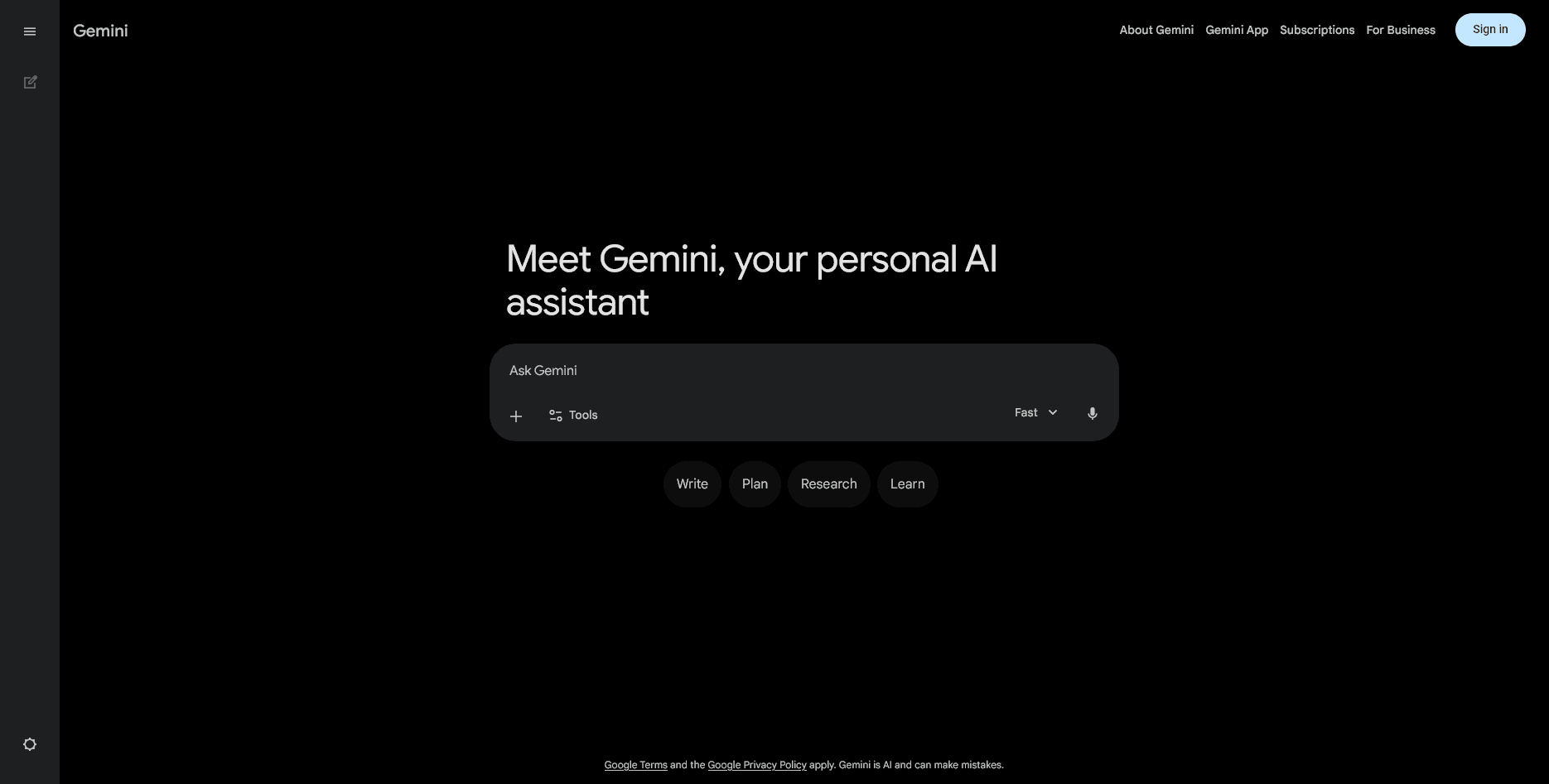
Gemini’s interface follows a minimalist conversational design similar to other modern AI chat systems.
The experience prioritizes:
- simplicity
- accessibility
- lightweight onboarding
- integration with Google accounts
The UI is generally clean and approachable for non-technical users.
Ease of Use
Gemini is relatively easy to start using compared with more developer-focused AI systems.
The platform is suitable for:
- casual users
- students
- professionals
- business teams
- Workspace users
The learning curve remains low for standard productivity tasks.
Workflow Orientation
Gemini increasingly functions less as a standalone chatbot and more as an AI layer embedded across Google’s ecosystem.
This ecosystem-centric approach is one of its strongest strategic advantages.
Users already relying heavily on:
- Gmail
- Docs
- Android
- Google Search
- Drive
may find Gemini more operationally convenient than disconnected AI platforms.
Coding and Developer Capabilities
Gemini includes coding assistance capabilities for:
- code generation
- debugging
- explanations
- documentation
- refactoring
Google has also expanded Gemini availability across developer tools and APIs through:
- Google AI Studio
- Vertex AI
- cloud integrations
While Gemini is increasingly competitive in coding workflows, many developers still compare it directly against:
- OpenAI ChatGPT
- Anthropic Claude
- GitHub Copilot
- Cursor
- Codeium
Performance quality can vary significantly depending on:
- model tier
- prompt structure
- programming language
- task complexity
Performance and Reasoning
Strengths
Gemini performs well in:
- multimodal reasoning
- summarization
- productivity assistance
- contextual document analysis
- Workspace-centric workflows
- web-connected information retrieval
It is also increasingly strong in:
- educational support
- general-purpose assistance
- structured content generation
Weaknesses
Common criticisms include:
- inconsistent reasoning quality across versions
- occasional hallucinations
- uneven coding performance
- changing feature availability
- regional rollout fragmentation
Some advanced users also find Gemini less predictable than competing frontier models in highly technical workflows.
Pricing
| Plan | Pricing |
|---|---|
| Free Tier | Available |
| Gemini Advanced | Subscription-based |
| Enterprise | Custom pricing |
| API Access | Usage-based pricing through Google AI services |
Google frequently updates packaging and AI feature bundling, especially across Workspace subscriptions.
Public pricing structures may evolve as Google continues consolidating its AI offerings.
Pros
- Strong multimodal capabilities
- Deep Google Workspace integration
- Easy onboarding experience
- Large context handling
- Broad ecosystem support
- Web-connected workflows
- Useful for productivity automation
- Strong infrastructure backing from Google
Cons
- Feature fragmentation across regions
- Inconsistent reasoning quality in some tasks
- Enterprise structure can feel complex
- Advanced functionality may require subscriptions
- Coding performance still debated among developers
- Rapid product evolution may create workflow instability
Similar AI Tools
| Tool | Category |
|---|---|
| ChatGPT | Conversational AI platform |
| Claude | Long-context AI assistant |
| Microsoft Copilot | Productivity AI assistant |
| Perplexity | AI search and research assistant |
| Grok | Conversational AI assistant |
| Poe | Multi-model AI platform |
| Character.AI | Conversational character AI |
Comparison Table
| Feature | Gemini | ChatGPT | Claude |
|---|---|---|---|
| Multimodal Support | Strong | Strong | Moderate to strong |
| Google Workspace Integration | Excellent | Limited native integration | Limited |
| Coding Assistance | Strong | Very strong | Strong |
| Long Context Handling | Strong | Strong | Excellent |
| Ecosystem Integration | Extensive Google ecosystem | OpenAI ecosystem | More standalone |
| Enterprise Infrastructure | Strong | Strong | Growing |
| Research Workflow Utility | High | High | Very high |
| Ease of Use | High | High | High |
Who Should Use Gemini?
Gemini is particularly suitable for:
- Google Workspace users
- students and educators
- productivity-focused professionals
- multimodal AI workflows
- users wanting integrated AI assistance
- businesses already invested in Google Cloud or Workspace
It also works well for:
- document summarization
- email drafting
- research assistance
- everyday AI productivity tasks
Who Should Avoid This Tool
Gemini may not be ideal for users who:
- require highly deterministic outputs
- need maximum coding reliability
- prefer open-source local deployment
- want stable long-term feature consistency
- operate outside the Google ecosystem
- require specialized enterprise orchestration features
Advanced technical users focused heavily on autonomous agents or developer-first workflows may prefer more engineering-oriented platforms.
Final Verdict
Gemini has evolved significantly from its early Bard positioning into a broader multimodal AI platform integrated deeply into Google’s ecosystem.
Its strongest advantages are:
- multimodal understanding
- Workspace integration
- accessibility
- ecosystem reach
- productivity-focused workflows
Rather than competing purely as a standalone chatbot, Gemini increasingly functions as an AI infrastructure layer across Google products and services.
For users already embedded in the Google ecosystem, Gemini can provide a highly convenient and cohesive AI experience.
For advanced developers and technical power users, however, competing platforms may still offer more predictable performance, stronger coding specialization, or more mature orchestration capabilities depending on the workflow.
FAQs
Is Gemini the same as Bard?
Yes. Bard was rebranded to Gemini as Google unified its AI branding around the Gemini model family.
Is Gemini free to use?
Gemini offers a free tier, while advanced capabilities and premium models are available through subscription plans and enterprise offerings.
Does Gemini support image uploads?
Yes. Gemini supports multimodal interactions including image and document analysis.
Can Gemini access Google Docs and Gmail?
Yes. Gemini integrates with multiple Google Workspace services depending on permissions and subscription tier.
Is Gemini good for coding?
Gemini is capable in coding tasks, though developer opinions vary depending on workflow complexity and comparisons against competing coding assistants.
Editorial Ratings
| Category | Rating |
|---|---|
| Ease of Use | 4.8/5 |
| Multimodal Capability | 4.8/5 |
| Productivity Features | 4.9/5 |
| Coding Assistance | 4.4/5 |
| Enterprise Readiness | 4.7/5 |
| Ecosystem Integration | 4.9/5 |
| Research Utility | 4.6/5 |
| Overall Rating | 4.7/5 |